Fine-Tuning BERT for Text Classification with Python and HuggingFace
Fine-Tuning BERT for Text Classification with Python and HuggingFace
After the previous post on BERT's attention mechanism, the obvious next question is: how do you actually use it for a real task? This post is a practical walkthrough of fine-tuning bert-base-uncased for binary sentiment classification using the HuggingFace transformers library.
Images in this post are from Jay Alammar's Illustrated BERT and A Visual Guide to Using BERT (jalammar.github.io), used under CC BY-NC-SA 4.0.
What Fine-Tuning Means
BERT is pre-trained on 3.3 billion words. Fine-tuning means taking those weights as a starting point and continuing training on your labelled task data for a few epochs. You're not training from scratch — you're nudging a model that already understands English towards a specific behaviour.
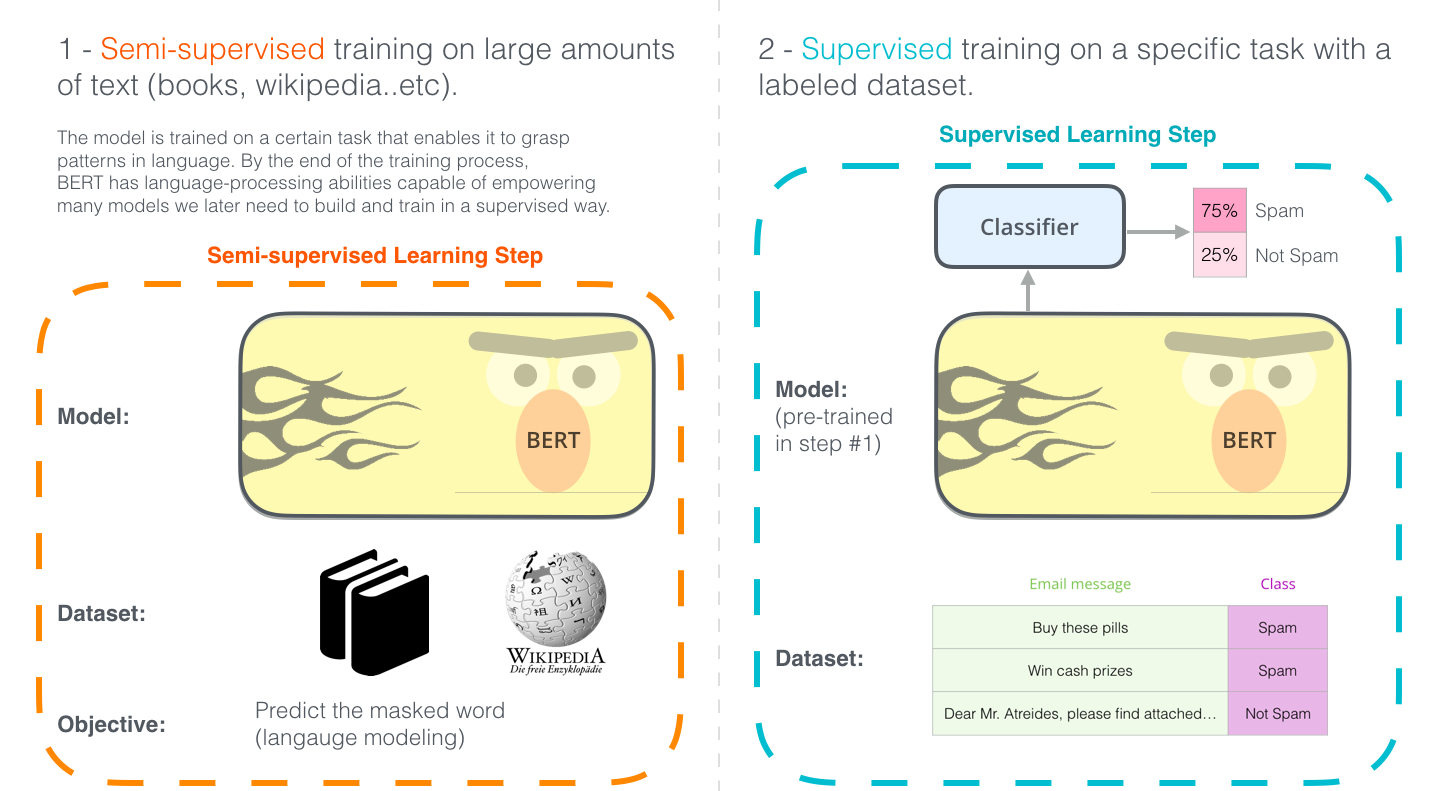
The architecture change for classification is minimal: add a single linear layer on top of BERT's [CLS] output vector and train the whole thing end-to-end.
![Spam classifier built on BERT — linear head on [CLS] output predicts label](https://jalammar.github.io/images/BERT-classification-spam.png)
The Dataset
We'll use the Stanford Sentiment Treebank (SST-2): short movie review sentences labelled positive (1) or negative (0).
from datasets import load_dataset

dataset = load_dataset("glue", "sst2")
# DatasetDict with train (67,349 examples) and validation (872 examples)
print(dataset["train"][0])
# {'sentence': 'hide new secretions from the parental units', 'label': 0, 'idx': 0}
Tokenisation
BERT uses WordPiece tokenisation. The tokenizer handles everything: splitting words into subwords, adding [CLS] and [SEP] tokens, padding, and building attention masks.
from transformers import BertTokenizer

tokenizer = BertTokenizer.from_pretrained("bert-base-uncased")

def tokenize(batch):
    return tokenizer(
        batch["sentence"],
        padding="max_length",
        truncation=True,
        max_length=128,
    )

tokenized = dataset.map(tokenize, batched=True)
tokenized = tokenized.rename_column("label", "labels")
tokenized.set_format("torch", columns=["input_ids", "attention_mask", "labels"])
The tokenizer adds [CLS] at position 0. After BERT processes the sequence, the [CLS] vector is what we feed to the classifier head.
![BERT processes tokenised input through stacked encoders; [CLS] output vector goes to classifier](https://jalammar.github.io/images/bert-contexualized-embeddings.png)
The Model
BertForSequenceClassification wraps bert-base-uncased and adds a dropout + linear head automatically:
from transformers import BertForSequenceClassification

model = BertForSequenceClassification.from_pretrained(
    "bert-base-uncased",
    num_labels=2,
)
Internally it's just:
BERT encoder → [CLS] output (768-dim) → Dropout(0.1) → Linear(768, 2) → logits
During fine-tuning, all 110M parameters are updated — not just the head. The pre-trained layers learn to shift their representations towards what's useful for sentiment.
Training with the Trainer API
HuggingFace's Trainer handles the training loop, gradient accumulation, evaluation, and checkpointing:
from transformers import TrainingArguments, Trainer
import numpy as np
from datasets import load_metric

metric = load_metric("glue", "sst2")

def compute_metrics(eval_pred):
    logits, labels = eval_pred
    predictions = np.argmax(logits, axis=-1)
    return metric.compute(predictions=predictions, references=labels)

training_args = TrainingArguments(
    output_dir="./bert-sst2",
    num_train_epochs=3,
    per_device_train_batch_size=32,
    per_device_eval_batch_size=64,
    warmup_steps=500,
    weight_decay=0.01,
    evaluation_strategy="epoch",
    save_strategy="epoch",
    load_best_model_at_end=True,
    logging_dir="./logs",
)

trainer = Trainer(
    model=model,
    args=training_args,
    train_dataset=tokenized["train"],
    eval_dataset=tokenized["validation"],
    compute_metrics=compute_metrics,
)

trainer.train()
Three epochs on SST-2 typically lands around 92–93% accuracy on the validation set. The original BERT paper reports 93.5%.
What's Happening During Training
Each training step:
- Forward pass: input tokens → BERT encoders →
[CLS]vector → logits - Loss: cross-entropy between logits and true labels
- Backward pass: gradients flow through the linear head and all 12 BERT encoder layers
- Optimiser step: AdamW with linear warmup
The warmup matters. BERT's weights are already in a good region — a high initial learning rate would destroy them. Warming up from 0 over 500 steps lets the optimiser find the right direction before committing.
Inference
from transformers import pipeline

classifier = pipeline(
    "text-classification",
    model="./bert-sst2/checkpoint-best",
    tokenizer=tokenizer,
)

results = classifier([
    "This film is a masterpiece of quiet storytelling.",
    "A tedious and overlong exercise in self-indulgence.",
])

for r in results:
    print(r)
# {'label': 'LABEL_1', 'score': 0.9987}  → positive
# {'label': 'LABEL_0', 'score': 0.9961}  → negative
Task Variants
The same pattern extends to other task types with different model classes and heads:
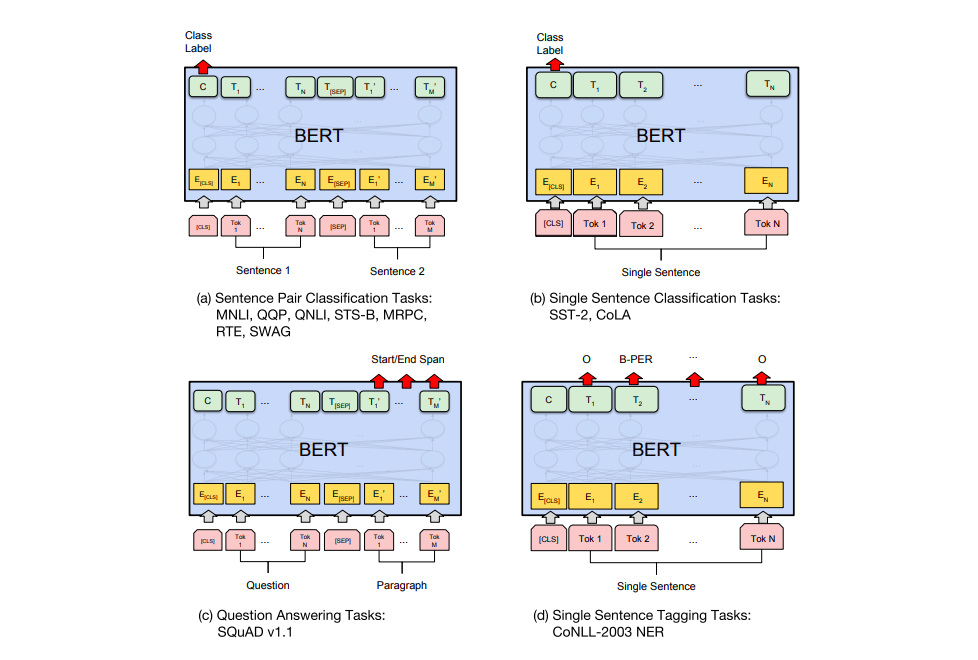
| Task | Model class | Input | Output head |
|---|---|---|---|
| Single sentence classification | BertForSequenceClassification | [CLS] sentence [SEP] | Linear on [CLS] |
| Sentence pair (NLI, paraphrase) | BertForSequenceClassification | [CLS] A [SEP] B [SEP] | Linear on [CLS] |
| Named entity recognition | BertForTokenClassification | [CLS] tokens [SEP] | Linear per token |
| Question answering | BertForQuestionAnswering | [CLS] question [SEP] passage [SEP] | Start/end span logits |
Practical Notes
Max sequence length: BERT was pre-trained with a max of 512 tokens. Longer documents need truncation or a sliding window strategy. For most classification tasks, 128 tokens is sufficient and trains 4× faster.
Batch size: Larger batches (32–64) are more stable for fine-tuning. If you're on limited GPU memory, use gradient accumulation:
TrainingArguments(gradient_accumulation_steps=4, per_device_train_batch_size=8)
This simulates batch size 32 with 8 examples per step.
Learning rate: 2e-5 to 5e-5 is the standard range. Too high and you'll overwrite the pre-trained representations; too low and fine-tuning stalls.
When to use DistilBERT instead: If you need fast inference and can accept ~2% accuracy drop, distilbert-base-uncased runs 60% faster with 40% fewer parameters. Just swap the model name — the rest of the code is identical.
The full runnable script is in projects/fine-tuning-bert-python/.